Human and AI interaction case study
AI in the Human Loop:
Designing & Wireframing sustainably and efficiently An exploratory HCI study of speed, traceability and human authority
As a UX researcher investigating how AI can reduce repetitive production work without taking design authority away from their author, I designed a pipeline that turns app maps, screenshots and my evaluation notes into editable text wireframes.
6 projects
generated for data collection and rule validation
8 test runs
using the same handover, model, tools and rules with different execution plans
36+ rules
general rules for every project, plus 8 for the banking domain, and still growing
Original screen
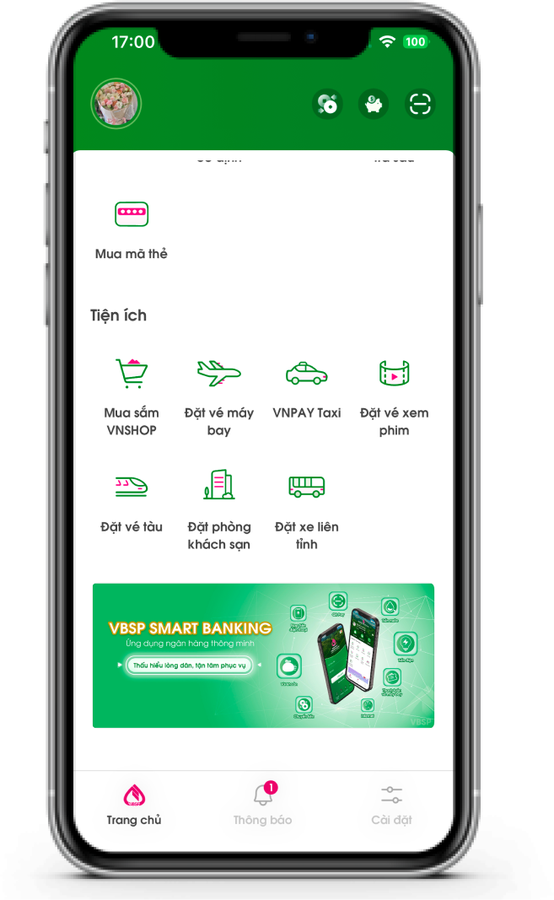
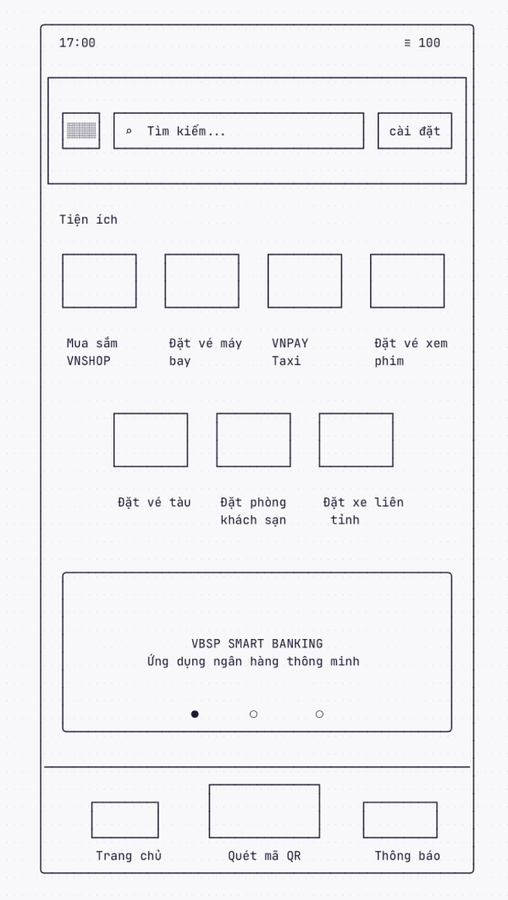
Wireframe from the tool
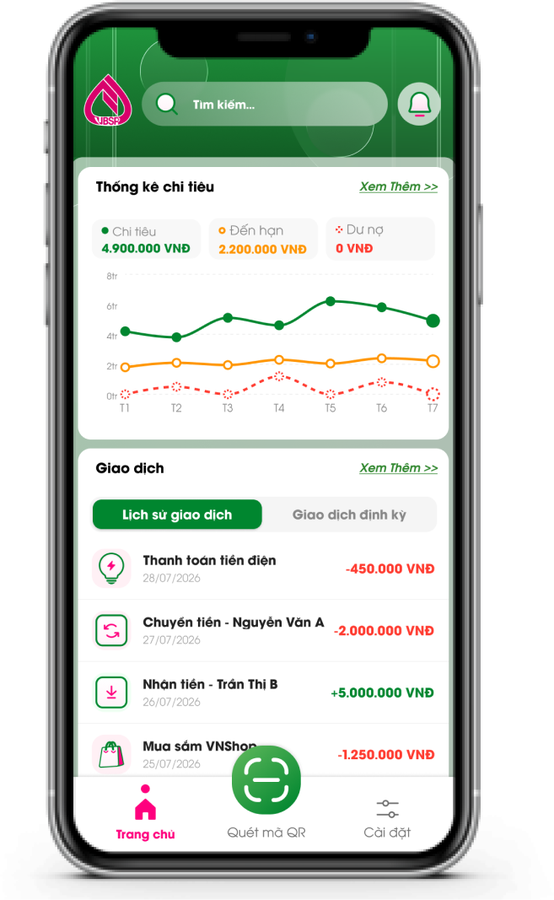
New design in Figma
The HCI question
How can AI accelerate wireframe production while preserving a designer’s agency, accountability and ability to understand the changes?
This project mentions wireframe generation of 3 different projects: VBSP, PB Engage, and Vietnam Airlines.
The problem that inspired this pipeline was the time consumption of creating wireframes to communicate across teams. A project manager would notify the design team that they had 1 week to do research and create a concept for the key screens. During the age of AI where everyone expects work to be fast tracked, this was not uncommon. I started off with connecting Wiretext MCP to Claude Code, generating every wireframe manually, screen to screen. As the need for this tool increased and the time distributed for design decreased, I saw a need to make a pipeline that held my decision making and logic in a format that UI Designers and product managers can understand.
What I investigated
Where human approval belongs, how decisions can remain traceable, and how different execution plans change time and computational cost.
What I gave the pipeline
Rules spanning position of components, logic for what components to use based on the nature of the app, the app map, and notes.
How the workflow distributes authority
Where it runs. The pipeline is a set of written instructions and small checking programs in a folder on my laptop, and it runs inside Claude Code, a coding assistant in a terminal window. A project is a folder too: the app map, the screenshots and my notes go in, one Markdown file per screen comes out. I talk to it in plain English in that window and it answers there.
I hand over three things: a map of the app, a screenshot of each screen, and my evaluation notes. From there the AI describes and proposes fixes for the screens in the form of Wiretext wireframes, and I decide whether the work continues. I edit each screen’s Markdown file and its Wiretext link by hand, and every drawing stays on my own computer for checking before anything is pushed to a GitHub repository. The seven steps below show who holds which decision.
- MeHandover. I give the tool the app map, screenshots and my evaluation notes.
- ToolFirst pass. A format check reads the folder first: one single page PDF per screen, a map whose text names every screen once, one notes file per screen. Then it lists every gap it found and gives me three choices: update the handover, continue without those screens, or stop.
- AIScreen description. A vision model reads the screenshot and writes it out in a fixed vocabulary of elements, structure only.
- My rulesCheck against the original. My general rules and project specific banking rules run over that description and flag possible problems. No generative model makes a decision in this step.
- AIRedesign and explanation. The AI proposes a redesign in my format and traces each change to a note or rule.
- ToolAutomatic checks. Eight programs look for missing or added elements, unanswered notes and format errors. They report discrepancies rather than certifying usability.
- MeMy decision. I approve, ask for changes, or skip. A correction I make becomes a project rule for later screens inside the current project, or a general rule if I state so.
Two modes, three levels of rules
I built two modes. Careful, the default, draws one screen and waits for my decision before the next. Fast draws one sample screen, waits for my approval, then draws the rest at once. Careful uses fewer tokens a screen and gives me a viewer for each screen. Fast finishes in minutes and gives me one long review.
Both modes work from the same three levels of rules. General rules apply to every project. Domain rules apply to one kind of product (banking, airlines…). Project rules are the ones I state while working, and each applies to every screen drawn after it. That is how the tool takes my fixes into account without a new round of instructions: a project rule is written into the project’s context file, each later helper reads that one section, and a correction costs a few lines rather than a longer conversation. It is also how a run recovers from a mistake.
Designing the boundary of control
The AI does the drawing, but the central design work was deciding how far to trust it. I kept generation, checking and judgment apart, so that a drawing that reads convincingly is never taken as a drawing that is right. The general checks are deterministic and cannot be bypassed without authorization; project-specific exceptions must be stated and recorded.
The AI may do alone
- Describe what each screenshot shows
- Redesign each screen and explain every change it made, against my rules and my notes
- Draw the wireframe in the format I designed
- Propose new rules, which wait for my yes
The system must check and report
- Possible elements that were dropped or added
- Whether every evaluation note received a response
- Whether the drawing follows the approved format and recorded rules
- Whether every required check ran; missing checks stop the workflow
It must stop and ask me
- Something in my handover is missing
- It is unsure what the screen shows or means
- A drawing would go to Wiretext or any outside service
- Any approval. I have the last say on its output.
Five design decisions
These decisions shaped both the tool and the research questions it raised.
Decision 1
Constrain autonomy before optimizing speed.
The tool may work through repetitive production tasks, but it has limits on run time, computational use and what counts as approval. It exists for time-bounded design sprints, not as a replacement for a designer.
Decision 2
Choose an output that remains inspectable and editable.
I chose Wiretext because plain text can be reviewed, versioned and changed without a proprietary visual editor. The Markdown file also preserves the screen’s structure, rationale and interaction logic for later work. More on that under Open Design.
Decision 3
Make local conventions explicit instead of assuming a universal default.
The Vietnamese banking and travel interfaces in my test projects used language, formatting and interaction conventions that general-purpose generators often failed to preserve. I encoded the conventions I observed as domain rules.
Decision 4
Keep the designer accountable for interpretation.
AI proposes; the designer remains responsible for deciding whether a change answers the research evidence and fits the context. Editable text, explicit rationale and recorded approval points make that responsibility visible rather than hiding it behind a polished generated screen.
Decision 5
Collect evidence for the next question.
The output is documentation as well as a wireframe: inputs, proposed changes, rule triggers, approvals, time and computational cost. That record makes the workflow open to critique and gives a future multi-designer study something concrete to test.
What it makes
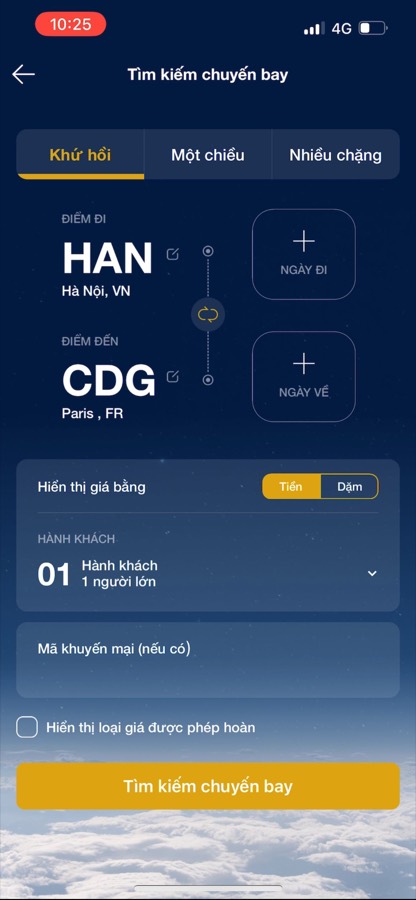
A wireframe in text form (example shown is from the Vietnam Airlines booking app), one of my test projects, drawn from one screenshot and four of my sticky notes. Everything in gold is a change the tool made, and for each one it wrote down which note or rule asked for it. The format is mine: the marks, the phone sized frame and interactive format visualization (buttons, tabs,…) all come from the general and project specific rules I stated.
Exploratory evaluation
I wanted to know what the execution plan alone costs. The rules, the handover and the approval points stayed the same, and the only thing I changed was how much the tool draws before it stops for me. I compared three executions of the same handover: the same app map, original screenshots and notes for 15 money transfer screens in PB Engage Vietnam. One run was Careful, one Fast, and one Hybrid: two careful screens followed by fast. Because I was the only reviewer and the runs were sequential, I treat this as a process comparison, not a controlled usability experiment.
The comparison exposed a useful trade off. Careful used the fewest helper tokens a screen, but it took the longest from start to approval. Of its 262 minutes, 46 were the machine working and the rest were mine. Fast did its machine work in 12 minutes and then waited about an hour on me. Hybrid finished soonest, 48 minutes with 26 of them machine work, and it used the most helper tokens. Its lead sits in my reviewing rather than in the machine: it waited 22 minutes on me where Fast waited 62. A project rule stated once on an OTP screen, to omit the phone’s own keyboard from the drawing, was applied consistently to later screens in all three runs.
Three runs against the clock
- Careful
- Fast
- Hybrid, two careful screens then fast
- the hollow dot is my last approval
Each dot is one helper reporting back, placed by the minute it reported and the helper tokens used by then. The dashed tail runs on to my last approval. Fast’s last drawing landed at 13 minutes, and then it waited an hour for me. Hybrid finished soonest at 48 minutes and on the most tokens. Careful ran to 262 minutes on the fewest, because it stops for me after every screen. Every time here is time on the clock.
Helper tokens a screen
Careful’s helpers used the fewest tokens a screen. Add my own estimate of the main chat and fast comes out lowest overall.
Helper runs it took
Runs with more helpers used more tokens in total.
The three runs, side by side
Same project, same day, same tool, same reviewer. The plan is what I changed on purpose. The order of the runs and the AI’s write-ups changed too. Every time on this page is time on the clock, from the handover to my last approval. The machine working is each helper timed from the work order that started it to the moment it reported back, with overlapping helpers counted once. The pipeline does not record that figure, so it is a reconstruction from the timestamps, good to a few minutes either way.
| Measured | Careful | Fast | Hybrid |
|---|---|---|---|
| Plan | careful | fast | two careful, then fast |
| Ran | second | first | third |
| Screens approved | 15 of 15 | 15 of 15 | 15 of 15 |
| Screens sent back | 1 | 0 | 1 |
| Helper runs | 17 | 28 | 35 |
| Helper tokens | 1,682,568 | 2,571,396 | 2,893,613 |
| Tokens a screen | 112k | 171k | 193k |
| Whole run, my reviewing included | 262 min | 74 min | 48 min |
| The machine working | 46 min | 12 min | 26 min |
| Waiting on me | 216 min | 62 min | 22 min |
| Questions the AI asked | 3 | 2 | 6 |
| Problems the rules found | 57 | 105 | 75 |
| This chat, my own estimate | about 2.5M tokens | about 1.5M tokens | about 2.4M tokens |
What the evidence supports
For this project, Careful used the fewest helper tokens, Fast minimized machine time, and Hybrid reached approval soonest. Those are three different measures. Fast’s helpers worked 12 minutes to hybrid’s 26, but hybrid was finished in 48 minutes to fast’s 74, because what separates the totals is how long each run stood waiting on me. Hybrid also used the most helper tokens, and it ran third, when I was quickest at reviewing, so I do not read its lead as a property of the plan. The traceability mechanism also worked as intended: one recorded project rule propagated to later screens.
Limits. One project, one reviewer and one run of each plan mean order effects and my growing familiarity are mixed into every difference. My approval is not evidence of user usability. The main coordinating chat was estimated rather than measured, and energy use was not measured.
Next study. I would ask multiple designers to use the workflow, examine where their rules agree or conflict, and evaluate selected outputs with representative users. That would test both designer agency and user outcomes instead of treating either as assumed.
What came after: Open Design
My first banking routine became the seed of Open Design, the tool my department’s AI team built. It reads a project’s documents and carries them to a text wireframe and a usability check before anyone opens Figma. The goal is to go on from there to screens built from the team’s own components. I shaped the two steps where judgment lives: the research criteria each screen has to meet, and the heuristic evaluation that scores the wireframe before UI is built.
- ToolDocs to Markdown. Pulls Confluence and JIRA sources into clean Markdown: every screen as a table of fields, with type, interaction, whether required, and length.
- ToolSystem map. Sorts the documents by app and records the handoffs between apps, one run for the whole project, editable by hand.
- AICustomer journey. Maps the end-to-end journey from the documents, with the source text behind each stage.
- My rules + AIUX research. Desk research against a UX knowledge base, NN/g, Baymard and Growth.Design, produces the criteria each screen must meet, tagged must, should or bonus, each with its reason, its journey stage and its source. This is where my rules went. There are also open source rules we allowed the LLM to take from.
- AI + my rulesUX spec. Writes the specification for each screen from the features and the journey, with a text wireframe in my format at desktop, tablet and mobile widths, and a link to open it in Wiretext.
- My rulesHeuristic evaluation. Generated screens and the logic behind them.
Every run leaves the same kind of record the wireframe pipeline does: the criteria, their sources, the findings and the cost. The UX spec run shown here took 8 minutes 10 seconds and about 40,000 output tokens. The product is an accounting system and the company data in the screens is sample data.
Reflections
Every number here is a cost or a count. None is a measure of quality.
That is the next study. Designers who have not seen the scores rate the same wireframes, and I learn whether the pipeline’s judgment predicts theirs. Until it does, I will not call a score a result.
The rules are the research.
What I want to study is how to formulate information so that both people and language models understand it, and how to do that with the least energy. The 36 rules on this page are a first draft of that question, and there are many more to find.
Autonomy and AI in the Human Loop
I built this project for an AI to sit in phases of a Human Loop, not controlling the entire operation. I’ve learned that understanding what LLM built is important to the design process, and to vibe code with guardrails in place.